Removing a Report Group
You may want to remove a report group when it is no longer needed or a duplicate was created by mistake. Before removing a report group, make sure it is no longer required, as any records that were part of the group will no longer be associated with it.
Any user with full access to reports in the Security Administration Facility window can add, edit, or remove report groups.
To remove a report group:
-
Do one of the following:
-
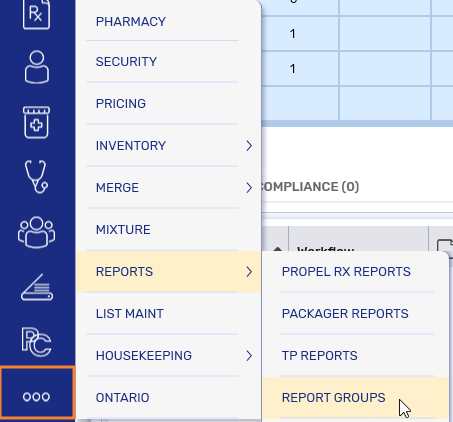
Select More (...) > Reports > Report Groups.
-
Open a report and select the Report Groups button at the bottom.

 Report Groups button is missing
A small subset of reports open in the old Propel Rx Reports application, which does not have the Report Groups button. For these reports, access report groups from the More (...) menu.
The Report Groups window opens.
-
-
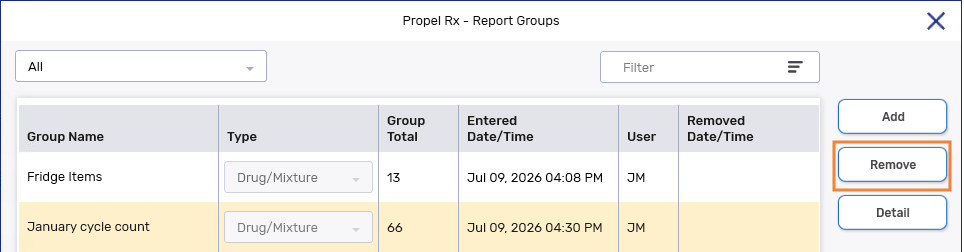
Select the report group you want to remove. Only one report group can be removed at a time.
-
Select Remove.
-
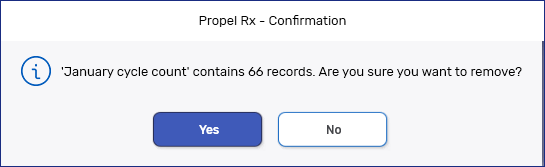
A prompt appears with the number of impacted records. Select Yes to confirm the removal.
-
Select Save.
-
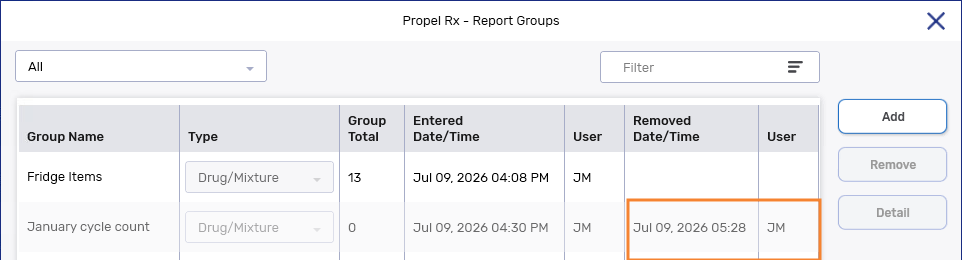
The report group is removed from the Report Groups window and all associated records will no longer display the report group.
-
The date timestamp and initials of the user who removed the report group is recorded in the window.
-